Native Instruments Kontakt 8.10.2 [Apple Silicon] [HCiSO]

Страницы:  1
Ответить
 

Kartun

Стаж: 21 год 1 месяц

Сообщений: 138

Kartun · 28-Май-26 19:25 (1 месяц 24 дня назад)

Native Instruments Kontakt
Год выпуска: 2026
Версия: 8.10.2
Разработчик: Native Instruments
Сайт разработчика: https://www.native-instruments.com/en/products/komplete/samplers/kontakt-8/
Платформа: Apple Silicon only
Язык интерфейса: английский
Таблетка: HCiSO
Системные требования: macOS 14, 15 and 26 (latest update)
Intel Core i5 or equivalent CPU, or Apple Silicon, 4 GB RAM (6 GB recommended)
Graphics hardware support for Direct 3D 11.1 (Feature Level 11_0) or higher
Supports ASIO, Core Audio, and WASAPI
Supported interfaces
macOS (64-bit only): Stand-alone, VST3, AU, AAX
Описание: Представьте себе любой звук – Kontakt позволит вам найти, создать и преобразовать его. Новейшая версия нашей революционной платформы для сэмплирования сочетает в себе совершенно новый набор интеллектуальных инструментов с бесчисленными возможностями звукового дизайна, меняя представление о том, как вы генерируете идеи и создаёте музыку.
Доп. информация:
8.10.2 (13.05.2026)
ИСПРАВЛЕНО: Сбой при загрузке проектов DAW при подключенном контроллере KKS MK3
8.10.1 (05.05.2026)
ИСПРАВЛЕНО: Интерфейс инструмента Komplete UI перезагружался дважды при перезагрузке инструмента с помощью кнопки перезапуска (!) в Kontakt
ИСПРАВЛЕНО: Форма волны Komplete UI смещалась при прокрутке стойки Kontakt
8.10.0 (29.04.2026)
ДОБАВЛЕНО: Новый инструмент: Aftertouch Tool генерирует полифоническое послекасание из любого MIDI-входа
ДОБАВЛЕНО: Поддержка NKS Connect
ДОБАВЛЕНО: Уведомления об обновлениях, которые будут появляться, если доступна более новая версия Kontakt для установки
ДОБАВЛЕНО: Наложение «Что нового», информирующее пользователей о любых изменениях после установки более новых версий Kontakt
ДОБАВЛЕНО: Новые инструменты для вас скрыты по умолчанию для платных пользователей Kontakt
ИСПРАВЛЕНО: Пользовательский порядок сортировки в боковой панели Браузер некорректно воспроизводился при определенных условиях
ИСПРАВЛЕНО: Информационная панель в боковой панели могла непреднамеренно обрезать текст
ИСПРАВЛЕНО: Сбой при перемещении некоторых инструментов между слотами
ИСПРАВЛЕНО: Некоторые библиотеки некорректно загружались в слот 1, что приводило к тишине
ИСПРАВЛЕНО: Замена инструмента могла привести к неправильному переупорядочиванию слотов
ИСПРАВЛЕНО: Переупорядочивание слотов инструментов приводило к отображению меню «Сохранить инструмент как» в неправильном порядке
ИСПРАВЛЕНО: Инструменты, отправляющие сообщения RPN, мешали инструментам, использующим RPN
ИСПРАВЛЕНО: Сопоставления контроллеров NKS не работали для инструментов
ИСПРАВЛЕНО: Световод NKS не всегда отображал правильный цвет ($KEY_COLOR_DEFAULT был синим вместо бирюзового на аппаратном обеспечении MK3)
ИСПРАВЛЕНО: Значения CC зависели от размера аудиобуфера и иногда игнорировались (обрабатывалось только одно значение контроллера на аудиобуфер)
ИСПРАВЛЕНО: Изменение высоты тона MIDI Pitch Bend изменяет высоту ноты, когда этого не должно происходить, для некоторых инструментов
ИЗМЕНЕНИЯ В КОНСТРУКТОРЕ
ДОБАВЛЕНА форма волны (по-прежнему) (экспериментальные) улучшения, включая исправления ошибок и полностью переписанный API для загрузки сэмплов и доступа к зонам из Komplete Script
ИСПРАВЛЕНО: Komplete UI Waveform отображает тишину слишком толстой линией
ИСПРАВЛЕНО: Komplete UI Waveform отображает ошибочные пики в конце сэмпла
Скриншоты
Скриншоты окна About
Download
Сайт не распространяет и не хранит электронные версии произведений, а лишь предоставляет доступ к создаваемому пользователями каталогу ссылок на торрент-файлы, которые содержат только списки хеш-сумм
Как скачивать? (для скачивания .torrent файлов необходима регистрация)
[Профиль]  [ЛС] 

AuntyRazor

Стаж: 11 лет 7 месяцев

Сообщений: 24


AuntyRazor · 01-Июн-26 21:09 (спустя 4 дня)

Is this the full version of Kontakt8? All of the other Mac torrents for Kontakt8 on rutracker are only for the free Kontakt Player. They claim to be Full Kontakt, but are false.
[Профиль]  [ЛС] 

NaChemLabaesh

Стаж: 1 год 9 месяцев

Сообщений: 409


NaChemLabaesh · 02-Июн-26 00:17 (спустя 3 часа, ред. 02-Июн-26 00:17)

They claim "to be Full Kontakt" because it is. Learn how to install it or ask nicely for help instead of making bold statement.
I never had any problems with HCiSO versions.
AuntyRazor писал(а):
89240195Is this the full version of Kontakt8? All of the other Mac torrents for Kontakt8 on rutracker are only for the free Kontakt Player. They claim to be Full Kontakt, but are false.
[Профиль]  [ЛС] 

Kond1e

Стаж: 2 года 10 месяцев

Сообщений: 2


Kond1e · 03-Июн-26 10:07 (спустя 1 день 9 часов)

Привет, ребята, можете мне помочь? Я использую Kontakt 7, скрипты и всё такое, но после обновления до версии 8 у меня ничего не получается, скрипты не загружают библиотеки. Пришлось ли мне удалить старую версию Kontakt?
[Профиль]  [ЛС] 

AuntyRazor

Стаж: 11 лет 7 месяцев

Сообщений: 24


AuntyRazor · 03-Июн-26 23:44 (спустя 13 часов)

NaChemLabaesh писал(а):
89240599They claim "to be Full Kontakt" because it is. Learn how to install it or ask nicely for help instead of making bold statement.
I never had any problems with HCiSO versions.
AuntyRazor писал(а):
89240195Is this the full version of Kontakt8? All of the other Mac torrents for Kontakt8 on rutracker are only for the free Kontakt Player. They claim to be Full Kontakt, but are false.
Did somebody hurt you?
[Профиль]  [ЛС] 

Dezzgan

Стаж: 4 года 10 месяцев

Сообщений: 59


Dezzgan · 04-Июн-26 19:51 (спустя 20 часов, ред. 04-Июн-26 19:51)

Ne rabotaet! v Ableton Videt tolko AU-kotoryj ne otkryvaetsia(
VST3,2- Ablik ne vidit(
Intel core i7,Ventura 13.7.8
[Профиль]  [ЛС] 

NaChemLabaesh

Стаж: 1 год 9 месяцев

Сообщений: 409


NaChemLabaesh · 05-Июн-26 11:27 (спустя 15 часов)

Спасибо за раздачу. VST3 & AU работают прекрасно (Logic, Cubase, Live, Bitwig, т.д.)


[Профиль]  [ЛС] 

lordzeta

Стаж: 6 лет 8 месяцев

Сообщений: 1


lordzeta · 06-Июн-26 02:33 (спустя 15 часов)

# 🎹 How to Install Kontakt Libraries on Mac without Native Access
> Tutorial for anyone who has libraries on an external drive and wants to install them in Kontakt 8 without needing Native Access.
---
## What you'll need
- Mac with Kontakt 8 installed
- Libraries on an external drive (with a `.nicnt` file inside)
- The `add-library.sh` script (ask a friend or download from a trusted forum)
- Terminal (already comes with Mac)
---
## Step 1 — Prepare the script
The script cannot run directly from an external drive. Copy it to a folder on your Mac:
1. Create a folder called **Script** on your Desktop
2. Place the `add-library.sh` file inside it
---
## Step 2 — Run the script on a library
Open **Terminal** and paste this command:
```bash
bash ~/Desktop/Script/add-library.sh
```
Leave a **space at the end** and drag the library folder from Finder directly into the Terminal. The path will appear automatically. Press **Enter**.
**Example:**
```bash
bash ~/Desktop/Script/add-library.sh "/Volumes/Audio Tools/Soundbanks/Vintage Organs Library"
```
Type your **administrator password** when prompted and press Enter (nothing appears while typing — that's normal).
---
## Step 3 — Check if it worked
If you see this in the Terminal, it worked ✅:
```
Name = "Library Name";
ContentDir = "Audio Tools:Soundbanks:Library Name:";
```
If `ContentDir` is filled in = installed successfully!
---
## Common issues and solutions
### ❌ "osascript: can't open default scripting component"
The script is running from the external drive. Copy it to the Desktop as shown in Step 1.
### ❌ "Could not parse" or empty `ContentDir`
The folder name has **brackets `[ ]`** or a **trailing space**. Rename the folder in Finder to remove those characters and run the script again.
### ❌ "Library not found" in Kontakt
The registered path is wrong. Run the script again pointing to the correct subfolder where the `.nicnt` file is located. Use the command below to check the folder structure:
```bash
ls "/Volumes/YourDrive/Soundbanks/Library Name/"
```
### ❌ "This instrument belongs to a library that is not installed"
Kontakt lost the registration. Run the script again on the library and restart Kontakt.
### ❌ "Content Missing" (1000+ files not found)
The samples are in a different folder. In Kontakt click **Browse for folder** and point to the correct folder containing the samples. Or check if the library has a samples `.pkg` that hasn't been installed yet:
```bash
sudo installer -pkg "/path/to/Library Part 2.pkg" -target /
```
---
## Important tips
- **Trailing space in the folder name** is the most common issue — always rename in Finder before running the script
- **Brackets `[ ]`** in the name also break things — remove them from the folder name
- Some errors like `sed: first RE may not be empty` and `Document is empty` are **normal** and don't affect the installation
- After installing, **always close and reopen Kontakt** so it can recognize the new libraries
---
## Bonus — Custom wallpaper in the Libraries tab
Want to add a cool image to your library in Kontakt's Libraries tab?
1. Get an image of the library (cover art, logo, etc.)
2. Resize it to **636x98 pixels** (you can use [Canva](https://canva.com) or Photoshop)
3. Save it as `wallpaper.png`
4. Place it inside the library folder, in the same location as the `.nicnt` file
5. Restart Kontakt — the image will appear automatically!
---
## Quick summary
```
1. Put the script on the Desktop
2. Open Terminal
3. Paste: bash ~/Desktop/Script/add-library.sh
4. Drag the library folder into Terminal
5. Press Enter and type your password
6. Restart Kontakt
7. 🎹 Enjoy!
```
---
*Tutorial based on real experience installing multiple NI libraries on macOS with Kontakt 8.*
---
*by @krashmusicbr*
[Профиль]  [ЛС] 

Music Teacher

Стаж: 4 года 3 месяца

Сообщений: 1


Music Teacher · 06-Июн-26 22:09 (спустя 19 часов)

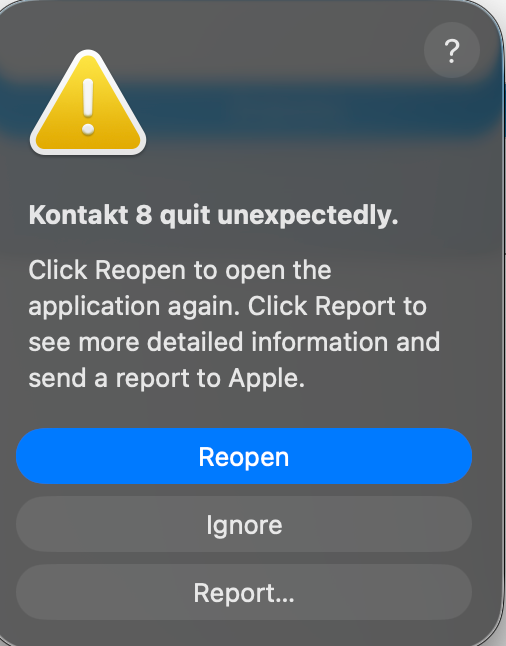
After installation, when I try to open it, I'm getting this message. What should I do? It's not even opening. It always gives me this message before it even opens.
https://i127.fastpic.org/big/2026/0606/2f/ac121acd95b77e81cbbe96c8ee41582f.png
[Профиль]  [ЛС] 

Latyshev.IS

Стаж: 1 год

Сообщений: 1


Latyshev.IS · 11-Июн-26 09:36 (спустя 4 дня)

Обновил свою старую версию 8.5 до текущей, всё работает, спасибо !
[Профиль]  [ЛС] 

C.F.C.

Стаж: 13 лет 7 месяцев

Сообщений: 5


C.F.C. · 15-Июн-26 13:06 (спустя 4 дня)

При активации предложил демо, лицензию или активацию, что нажимать?
[Профиль]  [ЛС] 

Benjamin Daniell

Стаж: 13 лет 7 месяцев

Сообщений: 1


Benjamin Daniell · 20-Июн-26 21:45 (спустя 5 дней)

lordzeta писал(а):
89251860# 🎹 How to Install Kontakt Libraries on Mac without Native Access
> Tutorial for anyone who has libraries on an external drive and wants to install them in Kontakt 8 without needing Native Access.
---
## What you'll need
- Mac with Kontakt 8 installed
- Libraries on an external drive (with a `.nicnt` file inside)
- The `add-library.sh` script (ask a friend or download from a trusted forum)
- Terminal (already comes with Mac)
---
## Step 1 — Prepare the script
The script cannot run directly from an external drive. Copy it to a folder on your Mac:
1. Create a folder called **Script** on your Desktop
2. Place the `add-library.sh` file inside it
---
## Step 2 — Run the script on a library
Open **Terminal** and paste this command:
```bash
bash ~/Desktop/Script/add-library.sh
```
Leave a **space at the end** and drag the library folder from Finder directly into the Terminal. The path will appear automatically. Press **Enter**.
**Example:**
```bash
bash ~/Desktop/Script/add-library.sh "/Volumes/Audio Tools/Soundbanks/Vintage Organs Library"
```
Type your **administrator password** when prompted and press Enter (nothing appears while typing — that's normal).
---
## Step 3 — Check if it worked
If you see this in the Terminal, it worked ✅:
```
Name = "Library Name";
ContentDir = "Audio Tools:Soundbanks:Library Name:";
```
If `ContentDir` is filled in = installed successfully!
---
## Common issues and solutions
### ❌ "osascript: can't open default scripting component"
The script is running from the external drive. Copy it to the Desktop as shown in Step 1.
### ❌ "Could not parse" or empty `ContentDir`
The folder name has **brackets `[ ]`** or a **trailing space**. Rename the folder in Finder to remove those characters and run the script again.
### ❌ "Library not found" in Kontakt
The registered path is wrong. Run the script again pointing to the correct subfolder where the `.nicnt` file is located. Use the command below to check the folder structure:
```bash
ls "/Volumes/YourDrive/Soundbanks/Library Name/"
```
### ❌ "This instrument belongs to a library that is not installed"
Kontakt lost the registration. Run the script again on the library and restart Kontakt.
### ❌ "Content Missing" (1000+ files not found)
The samples are in a different folder. In Kontakt click **Browse for folder** and point to the correct folder containing the samples. Or check if the library has a samples `.pkg` that hasn't been installed yet:
```bash
sudo installer -pkg "/path/to/Library Part 2.pkg" -target /
```
---
## Important tips
- **Trailing space in the folder name** is the most common issue — always rename in Finder before running the script
- **Brackets `[ ]`** in the name also break things — remove them from the folder name
- Some errors like `sed: first RE may not be empty` and `Document is empty` are **normal** and don't affect the installation
- After installing, **always close and reopen Kontakt** so it can recognize the new libraries
---
## Bonus — Custom wallpaper in the Libraries tab
Want to add a cool image to your library in Kontakt's Libraries tab?
1. Get an image of the library (cover art, logo, etc.)
2. Resize it to **636x98 pixels** (you can use [Canva](https://canva.com) or Photoshop)
3. Save it as `wallpaper.png`
4. Place it inside the library folder, in the same location as the `.nicnt` file
5. Restart Kontakt — the image will appear automatically!
---
## Quick summary
```
1. Put the script on the Desktop
2. Open Terminal
3. Paste: bash ~/Desktop/Script/add-library.sh
4. Drag the library folder into Terminal
5. Press Enter and type your password
6. Restart Kontakt
7. 🎹 Enjoy!
```
---
*Tutorial based on real experience installing multiple NI libraries on macOS with Kontakt 8.*
---
*by @krashmusicbr*
Hi - please can you provide an example of the script you mentioned. I don't have a friend and can't find a trusted forum.
Also, it says DEMO in red letter at the top in Kontakt ... please advise.
[Профиль]  [ЛС] 

Majyl

Стаж: 6 лет 6 месяцев

Сообщений: 11


Majyl · 26-Июн-26 12:57 (спустя 5 дней)

По итогу у меня установился Kontakt Player, в котором даже функции поиска нет. Что я сделал не так, подскажите, ребята?
[Профиль]  [ЛС] 

NaChemLabaesh

Стаж: 1 год 9 месяцев

Сообщений: 409


NaChemLabaesh · 26-Июн-26 18:06 (спустя 5 часов)

Цитата:
Hi - please can you provide an example of the script you mentioned. I don't have a friend and can't find a trusted forum.
Also, it says DEMO in red letter at the top in Kontakt ... please advise.
[Профиль]  [ЛС] 

Valterz

Стаж: 17 лет 2 месяца

Сообщений: 43


Valterz · 02-Июл-26 14:01 (спустя 5 дней)

Macbook air m1 Sonoma 14.8.5
Ableton 12.1.1 не показывает в списке плагинов (хотя видно что загружает)
В Reaper все работает. Есть фикс?
(спасибо за раздачу)
[Профиль]  [ЛС] 

matrix198605

Стаж: 12 лет 9 месяцев

Сообщений: 45


matrix198605 · 04-Июл-26 15:46 (спустя 2 дня 1 час)

не открывает на мак м1 только AU видит и не открывает все равно VST 3 вообще error пишет, кто устанавливал напишите что не так?
[Профиль]  [ЛС] 

Denver kapoor

Стаж: 3 года 11 месяцев

Сообщений: 1


Denver kapoor · 19-Июл-26 22:42 (спустя 15 дней)

Latyshev.IS писал(а):
89266079Обновил свою старую версию 8.5 до текущей, всё работает, спасибо !
Please guide.
[Профиль]  [ЛС] 
 
Ответить
Loading...
Error